Showing posts with label facebook. Show all posts

gravatar

9 Ways to Get Many commented on Facebook Fans Page

article-page-main-ehow-images-a08-0e-s5-hide-comment-facebook-home-800x800.jpg (225×220)

Hi friends Facebook, which has a fan page or fan page!
Having a lot of fans in the fan page is a hope and pride for the owner of the page. Especially when the fan page is being updated status almost always get a response (comments) that many of the fans.
But in reality, getting lots of comments for the fans need business page and workable strategy, because rarely do I encounter a fan page that has tens of thousands of fans just get a response from the fans a little better than they give thumbs up to their comments that this could happen tulis.Mengapa ? It resulted from lack of creative time status updates.
For that we need a creative way so many responses Fans Page on Facebook, following 9 Ways to Get Many commented on Facebook Fans Page:
This is the key to success for any status updates many of the comments, namely:ASK, will participate by asking them to answer the question more than just the thumb alone, would make an easy question and creatively, how? Want to know? Continue reading!
1. Ask specific questions as well as unique in which they commented on the questions Example: Did you ever open up when Boker? (Hehehe. .. aja ya-there's no question).
2. Ask a question yes or no. Example: Would you like to eat meat dragons? Wooow ....!
3. Ask questions about the activities. Example, Whether you're sweeping the road or being "quoted" (take) rambutan neighbors?
4. Asked about right or wrong, "Is it true that you rarely shower when leaving for school or to work?
5. Ask a question about the photo, share a photo to upload to the page anda.Studi case, "note the two following figures, which of orangutans and real people in this photo" (xixixixi. ...)
3f71a686.jpg (200×122)
6. Ask fun questions, Example: What is your favorite sport?
7. Facebook provides a new feature of "Question" feature that makes it easy to create voting on the page, this will improve their response to comment. So use the features of this question for a vote on something.
8. Asking questions of choice, "when you are in school or college, whether you prefer essay questions or multiple choice?
9. This is probably the best question, who gets the most response to the commentary, ask them about "what memories or events that are not forgotten all your life?" Maybe you can give them a choice of answers to your questions like, "experience when falling in love or experience time to get a job first. "You can give them a choice about it.
9 Ways to Get Lots of comments on Facebook Fans Page above, where is the best way you think is the best and most creative ways to improve the response of the fans or do you have another answer. Please give your comments below.
Read more.. Bagikan
gravatar

Eliminate ads difacebook

credit: userscripts.org

to run this script .....

facebook ads first install it on each computer you ...

GreaseMonkey khusus untuk Firefox

GreaseMonkey khusus untuk IE 


if already, make sure the bottom right corner there is grease monkey icon it ..

preview: create firefox users who
Spoiler :     
http://i410.photobucket.com/albums/pp190/eta_rrrrock/untitled2-5.jpg
klo already installed, go to HERE>> cLIcK

preview
Spoiler :     
http://i410.photobucket.com/albums/pp190/eta_rrrrock/INSTAL.jpg
.. click on INSTALL and refresh your facebook ...
rather, make a cut down his load .. xixixixii
Read more.. Bagikan
gravatar

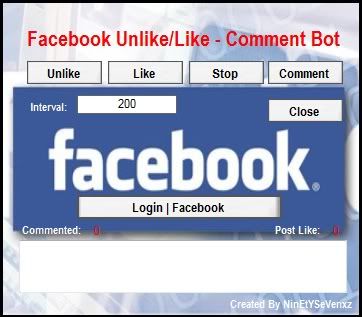
Facebook Bot Like,Unlike & Comment Bot

Screenshot 1:
http://i1212.photobucket.com/albums/cc443/2011Nuder/Bot1.jpg

Screenshot 2:
http://s1212.photobucket.com/albums/cc443/2011Nuder/Bot2.jpg


Download:

http://www.mediafire.com/?w7axvx5cipzba9a

Informasi

*Auto Jempol
*Auto Komen Status
*Auto Unlike Status
Read more.. Bagikan
gravatar

Cara Update Status Via Blackberry New version


Berhubung sekarang lagi nge-trend pakek ponsel Blackberry, oleh karena itu saya mau berbagi sedikit trik rahasia yang bisa di lakukan oleh beberapa orang yang tidak memakai BB.
Trik nya disini adalah menggunakan Blackberry Simulator, dan juga kita memakai alternatif lain yaitu JAVA.

Download dulu semua bahan-bahannya :

   1. Download BlackBerry_Email_MDS_4.1.2.17.exe.
   2. Download BlackBerry_Simulators_6.0.0.141_9800.exe.
   3. Download jdk-6u21-windows-i586.exe.

InsTall :
1. Buka Folder BlackBerry_Simulators_6.0.0.141_9800, klik kanan Open pada aplikasiBlackBerry_simulator_6.0.0.141_9800.exe

2. Klik tombol Next hingga halaman lisensi.
3.Pilih I accept, dan klik tombol Next hingga halaman instalansi.
4. Pada halaman instalasi klik Install, dan biarkan proses berjalan
5. Klik Finish setelah proses selesai.


Selesai ? belum!.Kita harus menginstall aplikasi pendukung Windows untuk menjalankan JAVA.Ini akan membuat Simulator berjalan berdasarkan program JAVA.

1.Klik kanan Open pada jdk-6u21-windows-i586.exe.
2.Pada tiga halaman berikutnya, klik Next.
3.Setelah proses instalasi, klik Finish.
4. Klik kanan Open pada BlackBerry_Email_MDS_4.1.2.17.exe.
5. Pilih I accept, dan klik tombol Next hingga halaman instalasi.
6. Klik Install pada halaman instalasi.
7. Proses selesai, kolik tombol Finish.
8. Buka menu Start > All Programs > Research In Motion >BlackBerry Email and MDS – MDS.
9.Jika ada jendela Security alert, klik Unblock (jika anda pengguna WIndows 7, Klik Aloow Access).
10. Jendela MDS akan muncul, klik minimize.
11. Buka menu start > all programs > research in motion > blackberry smartphone simulator – 6.0.0.141 – 9800.

12.Jika ada jendela security alert, klik unblock (bagi pengguna Windows 7 klik Allow Access).
13. Tunggu loading simulator selesai, klik oK.
14. Pilih menu view > graphics accel> eration> off.
http://blog.fastncheap.com/wp-content/uploads/2011/05/19.jpg

15. Klik menu blackberry > open tray.
16. Pilih, dan klik manage cennections.
17. Pastikan ada tanda centang pada kedua pilihan koneksi.
http://blog.fastncheap.com/wp-content/uploads/2011/05/22.jpg

18. Klik menu Blackberry >open tray > facebook.
19. Lalu masukkan e-mail dan password user kemudian klik login.
http://blog.fastncheap.com/wp-content/uploads/2011/05/24.jpg

20. Coba anda ketikkan Status anda pada kolom What’s On Your Mind, klik Share.
http://blog.fastncheap.com/wp-content/uploads/2011/05/25.jpg

21. Buka Browser Mozilla atau Internet Explorer anda, Login ke Account Facebook anda dan masuk Profile, dan lihat status baru anda.
Read more.. Bagikan
gravatar

Membuat BOT Auto Like Facebook

Langkah - Langkah nya :

1. Applikasi Facebook ,ambil API key + API Secret nya.(API Key beda dengan API ID,agak ribet memang untuk melihat api key Facebook ini sekarang : ) API key + Secret ini nantinya akan menggantikan tugas kita online dan melakukan aktifitas di Facebook tanpa perlu login. *Asal kita memberi otoritas kepada aplikasi tersebut.

2. PHP SDK Facebook versi lama 

3. Hosting support php + cronjob (semacam timer yang nanti melaksanakan perintah kita sesuai waktu yg ditentukan.) Bisa pake Free hosting seperti 000webhost.com atau youhosting.com (* yang laen belum nyoba support apa tidak ^__^ )

4. Copy dan edit code berikut
Code jempoler.php

Code:

<?php

class agendosa extends Exception { }

require_once '/direktori/tempat/upload/sdk/facebook.php';

$appapikey = 'API KEY MU';

$appsecret = 'API SECRETMU';

$facebook = new Facebook($appapikey, $appsecret);

function komentar($postid, $komentare, $uids){

if(file_exists("$uids")){

$cek = fopen("$uids",'r');

$str = fgets($cek);

fclose($cek);

if(!empty($str) && ($str != $post_id)){

if($pot[posts][0][comments][can_post] == 1){

$comment = $facebook->api_client->stream_addComment($postid, $komentare, "UID-FB-MU");

}

}

}

$log1 = fopen("$uids", 'w');

fwrite($log1, $postid);

fclose($log1);

}

$cek_permisi = $facebook->api_client->users_hasAppPermission("read_stream",'UID-FB-MU');

if($cek_permisi){

$friends = $facebook->api_client->friends_get(null, 'UID-FB-MU');

array_push($friends,'UID-FB-MU');

foreach ($friends as $uid)

{

try{

$pot = $facebook->api_client->stream_get('UID-FB-MU',"$uid",'','',1,'','','','');

if(is_array($pot)){

if($pot[posts][0]){

if($pot[posts][0][actor_id]){

if($uid == 'UID-FB-MU'){

if($pot[posts][0][likes]){

if($pot[posts][0][likes][can_like] == 1){

$like = $facebook->api_client->stream_addLike($pot[posts][0][post_id], 'UID-FB-MU');

}

}

}else{

if($pot[posts][0][actor_id] == $uid){

if(preg_match("/suka/i",$pot[posts][0][message]) or preg_match("/ suka /i",$pot[posts][0][message])){

komentar($pot[posts][0][post_id], "like..this..", "$uid");

}

else

{

if($pot[posts][0][likes]){

if($pot[posts][0][likes][can_like] == 1){

$like = $facebook->api_client->stream_addLike($pot[posts][0][post_id], 'UID-FB-MU');

}

}

}

}

}

}

}

}

}catch(agendosa $e){

throw $e;

}

sleep(1);

}

}

?>
Setelah semua bahan terkumpul upload php sdk + source code ke hostinganmu .

Edit code botnya nya pada bagian :

require_once '/direktori/tempat/upload/sdk/facebook.php';

$appapikey = 'API KEY MU';

$appsecret = 'API SECRETMU';

/direktori/tempat/upload/sdk/facebook.php >> ganti direktori tempat upload *view melalui file manager

API KEY MU dan API SECRETMU= ganti dengan aplikasi milikmu sendiri.

Ganti jugaUID-FB-MU dengan uid FB mu, dapat dilihat melalui
http://graph.facebook.com/usermu


Kalo’ kamu belum punya API key + secret silakan memakai API key + secret dibawah ini :

$appapikey = 'a8be3e413467033ecbadfb9b7603df3a';

$appsecret = 'cefcccd8d8c0b2257308e2c306dce6c0';

lalu join Apps disini :

Agen Dosa Facebook Lab  Khusus yg belum punya API key + Secret saja 

yang sudah punya API key + secret tinggal tambahin :

read_stream,publish_stream,sama offline_access

Selanjutnya,

Lihat contoh disini :

Saya memakai 000webhost untung test hostingnya,
http://www.agendosa.com/wp-content/uploads/2011/10/host-300x230.png

Setelah terupload lalu rubah permisi (chmod) direktori bot termasuk subfolder di dalamnya ke 777 .

http://www.agendosa.com/wp-content/uploads/2011/10/chmod1.png

seperti ini :

http://www.agendosa.com/wp-content/uploads/2011/10/chmod2.png

Pastikan semua sudah terupload dan kode sudah benar, mari kita test bot melalui direct link smile misal file tadi kita kasih nama jempoler.php dan di upload di bot.vio.gov.my maka >http://bot.vio.gov.my/jempoler.php , jika loading lama berarti si bot sedang melakukan aksinya, tinggal cek di beranda apakah status teman kamu sudah ada yang kamu jempoli tanpa sadar? selamat…tinggal setting cron / timernya biar kita nggak susah2 pencet directlink tiap mow eksekusi bot nya smile .

masih di panel 000webhost lihat disini :

http://www.agendosa.com/wp-content/uploads/2011/10/cj.png

Selesai !
Read more.. Bagikan
gravatar

40 Amazing Facebook Statistics

40 Amazing Facebook Statistics
Facebook has become a behemoth.
In the United Stated Facebook has surpassed even Google in terms of traffic.
Below I have collected 40 amazing facebook statistics, and I will update them as time goes on.
To the best of my knowledge all stats below are current (As of November 8th, 2010), and accurate.
If you like this post please share this post please share it with your friends! 40 Amazing Facebook Statistics

People on Facebook

1. More than 500 million active users
2. 50% of our active users log on to Facebook in any given day
3. Average user has 130 friends
4. People spend over 700 billion minutes per month on Facebook

Activity on Facebook

5. There are over 900 million objects that people interact with (pages, groups, events and community pages)
6. Average user is connected to 80 community pages, groups and events
7. Average user creates 90 pieces of content each month
8. More than 30 billion pieces of content (web links, news stories, blog posts, notes, photo albums, etc.) shared each month.

Global Reach

9. More than 70 translations of Facebook are available on the site
10. About 70% of Facebook users are outside the United States
11. Over 300,000 users helped translate the site through the translations application

Platform

12. More than one million developers and entrepreneurs from more than 180 countries
13. Every month, more than 70% of Facebook users engage with Platform applications\
14. More than 550,000 active applications currently on Facebook Platform
15. More than one million websites have integrated with Facebook Platform
16. More than 150 million people engage with Facebook on external websites every month
17. Two-thirds of comScore’s U.S. Top 100 websites and half of comScore’s Global Top 100 websites have integrated with Facebook

Mobile

18. There are more than 200 million active users currently accessing Facebook through their mobile devices.
19. People that use Facebook on their mobile devices are twice as active on Facebook than non-mobile users.
20. There are more than 200 mobile operators in 60 countries working to deploy and promote Facebook mobile products
All of  the content above is from facebook’s official press room stats page.
The remaining stats below are from elsewhere on the web.

Facebook Stats from Around the Web

21. Over 80% of businesses today are using facebook today.
22. Facebook has over 1,700 employees
23. Facebook is valued at between 7.9 and 11 billion dollars (and rising).
24. Facebook is an international phenomenon: 70% of Facebook users live outside of the United States.
25. There are over 3 million active Facebook fan pages.
26. There are over 1.5 million local businesses with Facebook pages.
27. More than 20 million people become fans of Facebook fan pages every single day. Join the FacebookFlow fan page today!
28. Facebook fan pages have created more than 5.3 billion fans.
29. The average Facebook user spends over 55 minutes on Facebook per day.
30. Women have 55% more posts on their wall than men.
31. More than 6 billion minutes are spent on Facebook each day.
32. More than 3 billion photos are uploaded to Facebook each month.
33. The United States is the country with the most Facebook users with 143,583,400 users. (via CheckFacebook.com)
34. 26.22% of the internet using world population are currently Facebook users.  (via CheckFacebook.com)
35. More than 250 applications have more than one million monthly active users.
36. Facebook has more than 45 million active user groups.
37. Over 30 billion pieces of content are shared on Facebook every month.
38. Texas Hold’em Poker currently has the most fans with 26,973,501. Via the Facebook Page Stats Leaderboard by allfacebook.
39. Static FBML is the most popular Facebook app with over 95,294,450 monthly application users.  (However this app can no longer be downloaded.) Via Facebakers Facebook stats.
40. If Facebook were a country it would be the third largest country in the world.
There you have it, 40 amazing Facebook stats!
Read more.. Bagikan
gravatar

10 Ideas to Get More Comments on Your Facebook Posts

So, you’ve built a Facebook presence for your company or organization, you’ve added tons of fans, and now you wonder, what’s next? Sure, you use your Facebook page to share the latest news about your company and to reach out to new customers, but most of the time your page just sits there. Look at some of the big Facebook pages, what do they have going for them that you do not? The answer is interactivity. The best Facebook pages are those that have posts, likes and especially comments from the fans. Therefore, if nothing exciting is going on, here are some ideas, fun and practical, for posts you can make to get your fans talking back.

1. Spoilers

This is one of the best ways to build suspense and excitement about your product or service. Give your fans a taste of what is coming up, without completely giving it away. Similar to a movie trailer or promo spot for a television show, pique their interest.

2. Personal Insight

Use your Facebook posts to give your fans a little insight into who you are as a person. People want to relate to the products and services they use, and if they learn more about the person behind the page, they will feel that connection with you.

3. Topical Jokes

Find jokes, comics or puns related to your company or industry. Generally if people bother to “like” your page, they at least have a passing interest in the field you’re involved with. This may take a bit of effort on your part, but find posts to make your fans smile.
10 Ideas to Get More Comments on Your Facebook Posts

4. Links

Along the same lines, share useful and fun links with your fans. You do not want to bombard them with hundreds of messages like this, but if you find a useful app, page or even an amazing video, do not be afraid to share it with your fans.

5. Challenges

This is especially useful for Facebook app pages, but can be adapted for nearly any page. Challenge your fans to beat a high score, discover new content or add something to your page. People naturally want to prove themselves and a challenge is sure to appeal to those with a competitive side.

6. Contests

You do not have to offer anything major, but hold a drawing, ask a trivia question or any otherwise host a contest for your fans. Just giving away a T-shirt with your logo or a credit for your services will encourage your fans to jump in and participate.
10 Ideas to Get More Comments on Your Facebook Posts

7. Requests for Input

Very few companies actually solicit advice from their customer base, and this is a shame. Ask your customers what you can do better, what products or services they are looking for or anything else on which you want input.

8. Holiday Wishes

Take time to wish your customers and fans a happy holiday. You don’t have to limit yourself to the more typical holidays. Wish your fans a happy Chinese New Year, Cinco De Mayo or even “Talk Like a Pirate Day.”

9. Fun at the Office

Another way to prove yourself as a “real” person instead of just a faceless corporation is to give your fans an insight into the company. Take some pictures of you and your staff at work or play and share these with your fans.

10. Commentary on Current Events

This is one you want to be careful with, you likely want to avoid strong political leanings, but mentioning current events is always a great way to get people talking; everyone has an opinion.
These are just a few of the types of posts you can make that will get your fans interacting on your Facebook fan page. If your page is more interactive, not only will your current fans be more likely to come back and check out what’s new, they may share your posts on their own feed, which will lead new fans directly to your page. Take the time to make regular posts on your Facebook page so it does not become stagnant, and you are certain to reap the benefits of a larger and more active fan base.
If you have any more ideas, share them with the rest of us in the comments below!
Read more.. Bagikan
gravatar

How to Display Facebook Fan Count in Text

Adding a Facebook Like Button on your website or blog is perhaps one of the easiest and most effective way to get more fans and earn more likes. If you have hundreds, thousand or perhaps tens of thousand of fans, it might be a good idea to publish a fan count. Fan count displays in numeric text total fans your Facebook page has, or rather, how many have liked your page.
preview How to Display Facebook Fan Count in Text
The technique is simple and very similar to displaying Google feedcount in text. The only difference is – we will be using Facebook’s API. In this post, we want to show you how it can be done so you can add them into your WordPress blog or PHP powered website. Load up your favorite code editor, here we go.

Step 1 – Get API Key, Application Secret & Page ID

These are the three mandatory information you’ll need to get things started.
API Key and Application Secret
  1. Sign in to your Facebook and click on Developer‘s link on the site bar. (If you don’t have a Developer’s account, you will have to sign up for one first)
    facebook developer link How to Display Facebook Fan Count in Text
  2. Click "Set Up New Application". Enter any application name, agree to the Facebook terms and click "Create Application". Note: We are not going to create a real application, but we’ll need to go through these processes to get a API Key and Application Secret.
    create application How to Display Facebook Fan Count in Text
  3. On the next page, you should be able to see your personal API Key and Application Secret. Copy it down somewhere or leave the browser window open.
    api key How to Display Facebook Fan Count in Text
Page ID
Page ID is the ID of your Facebook Fan Page. If you don’t have a Facebook Fan page, you’ll have to first create one. To get the ID of your Fan page, click edit page, and look for your ID (numbers) at the end of the URL – http://www.facebook.com/pages/edit/?id=XXXXXXXXX

Step 2 – Get Facebook.php

You’ll also need the Facebook API PHP SDK file called Facebook.php. Download it, and place it in the root of your folder. Learn more about Facebook PHP SDK.
php sdk How to Display Facebook Fan Count in Text

Step 3 – Display Fancount

To show off your fancount, place the following code in your php file,
  1. <?php  
  2. require_once('facebook.php');  
  3. $facebook = new Facebook(array(  
  4.     'appId'  => 'app_id',  
  5.     'secret' => 'secret_key',  
  6.     'cookie' => true,  
  7. ));  
  8. $result = $facebook->api(array(  
  9.     'method' => 'fql.query',  
  10.     'query' => 'select fan_count from page where page_id = page_id;'  
  11. ));  
  12. $fb_fans = $result[0]['fan_count'];  
  13. ?>  
And then you will want to edit the codes to change the following:
  • Line 4 – Replace app_id with your Facebook Application ID.
  • Line 5 – Replace secret_key with Secret.
  • Line 10 – Replace the last page_id with your Facebook Fanpage ID.
Please refer to Step 1 on how to get app_id, secret_key and page_id.
To display the fancount, insert this following code anywhere in the page:
  1. <?php echo $fb_fans; ?>  
That’s all. Style your fancount and make it attractive. See a working example on Psdeluxe‘s top right corner.
Read more.. Bagikan

Sponsored

Recent Post